
Reading your report
The most important page in this guide. Click any page in Pages to open its report.
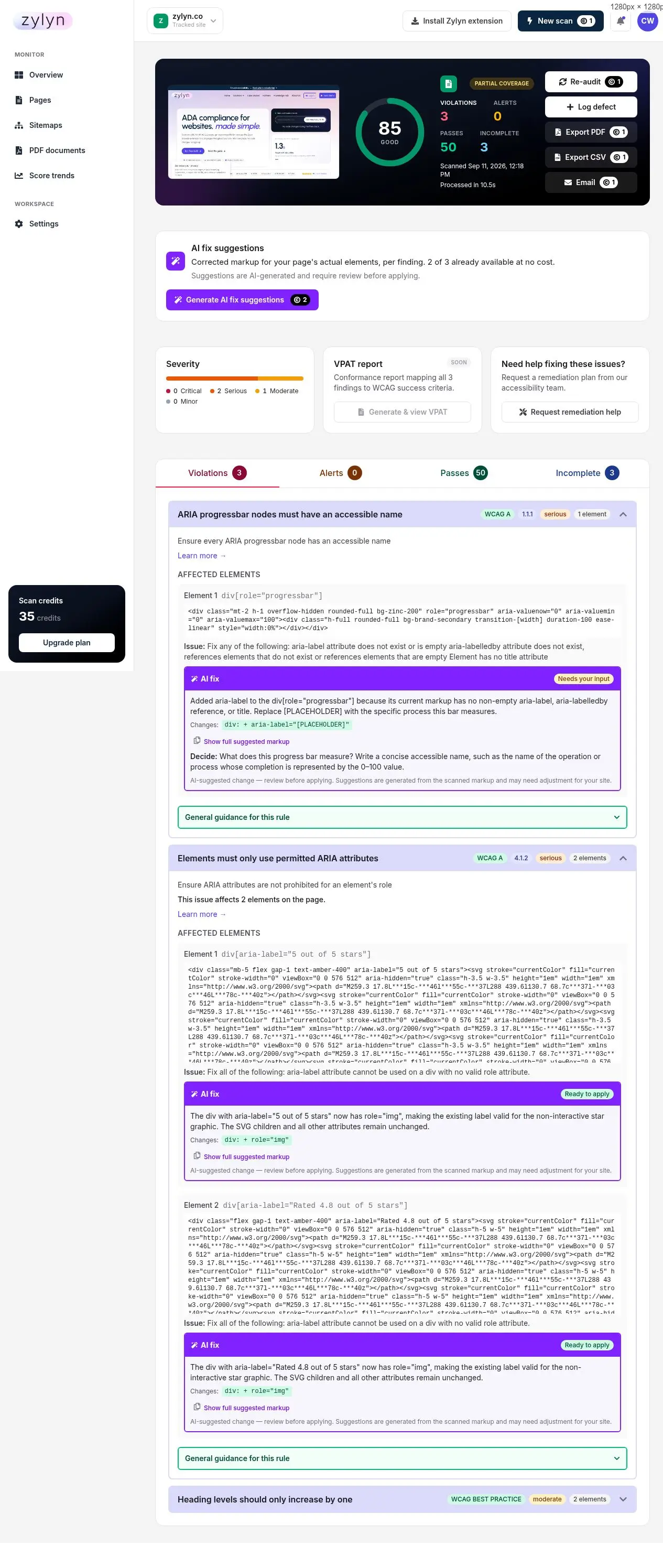
The four result buckets#
| Bucket | What it means | Do you act? |
|---|---|---|
| Violations | Definite problems. Zylyn is confident these break accessibility. | Yes — this is your work list. |
| Alerts | Things that are probably fine but worth a look. | Review if you have time |
| Passes | Checks your page passed. | No — this is reassurance |
| Incomplete | Zylyn could not decide. Needs human judgement. | Yes — have someone look |
Do not ignore Incomplete. It does not mean "fine". It means the scanner hit something it cannot evaluate — text over a background image, a control whose purpose depends on context. These are often real problems that automation cannot confirm.
You may also see Partial coverage near the score. That flags that some content — typically third-party iframes — could not be scanned, and the report is for what Zylyn could reach.
Severity: what to fix first#
Four levels, and they are a genuine priority order:
| Severity | Meaning | Priority |
|---|---|---|
| Critical | Blocks people from using the page at all | Fix now |
| Serious | Major barrier; many users affected | Fix this sprint |
| Moderate | Real but works around-able | Backlog |
| Minor | Polish | When convenient |
Fix Critical and Serious first. They are both the largest real-world barriers and the findings that appear in legal complaints.
WCAG failures versus best practice#
This trips people up, so it's worth being precise.
Each finding is tagged either with a WCAG level and criterion (e.g. WCAG AA · 1.4.3) or with WCAG BEST PRACTICE.
- A tagged criterion = a failure against the actual standard. This is what conformance and legal exposure are judged on.
- BEST PRACTICE = a recommendation that improves accessibility but is not a WCAG failure. Examples: "Document should have one main landmark", "All page content should be contained by landmarks", "The skip-link target should exist and be focusable".
Both are worth fixing. But if someone asks "are we WCAG conformant?", only the tagged criteria answer that question — and a page can look alarming while having only one or two real failures. When reporting to a client or a board, count the WCAG-tagged findings, not the raw total.
Per-finding detail#
Expand any finding and you get:
- Plain-English explanation of the rule, plus a Learn more link to the full documentation
- Affected elements, each with its CSS selector and the actual markup from your page
- The precise problem. Contrast findings include the measured ratio, both colours, font size and weight, and the required ratio — for example:
That is enough for a developer to fix without guessing. Hand them the selector and the numbers.
Where a finding affects many elements, the report shows the first five and tells you the total.
What automated scanning cannot find#
Be clear-eyed about this, because it determines how much assurance a clean report gives you.
Automated tools reliably cover roughly 20–40% of WCAG success criteria. They are excellent at mechanical checks — missing alt text, contrast ratios, unlabelled form fields, heading structure. They cannot assess:
- Whether alt text is meaningful (
alt="image123"passes; it helps nobody) - Whether keyboard focus order makes logical sense
- Whether a screen reader announces a custom control usefully
- Whether an error message actually tells the user how to recover
- Whether your content is understandable
A 100/100 score does not mean your site is accessible. It means the machine-checkable part is clean. For conformance you can defend, you need manual testing with assistive technology — use Request remediation help on any report.
Actions available on a report#
| Action | Cost | What it does |
|---|---|---|
| Re-audit | 1 credit | Re-scan to verify a fix |
| Log defect | Free | Track the finding as a defect |
| Export PDF | 1 credit | Formatted report — see exporting |
| Export CSV | 1 credit | Spreadsheet of findings |
| 1 credit | Send the report | |
| Generate AI fix suggestions | 2 credits per finding | See AI fix suggestions |
| Generate & view VPAT | — | Not available yet ("Soon") |
| Request remediation help | Free | Contact the Zylyn team |