
The dashboard
Your site's accessibility health on one screen. Open it from Overview in the left sidebar.
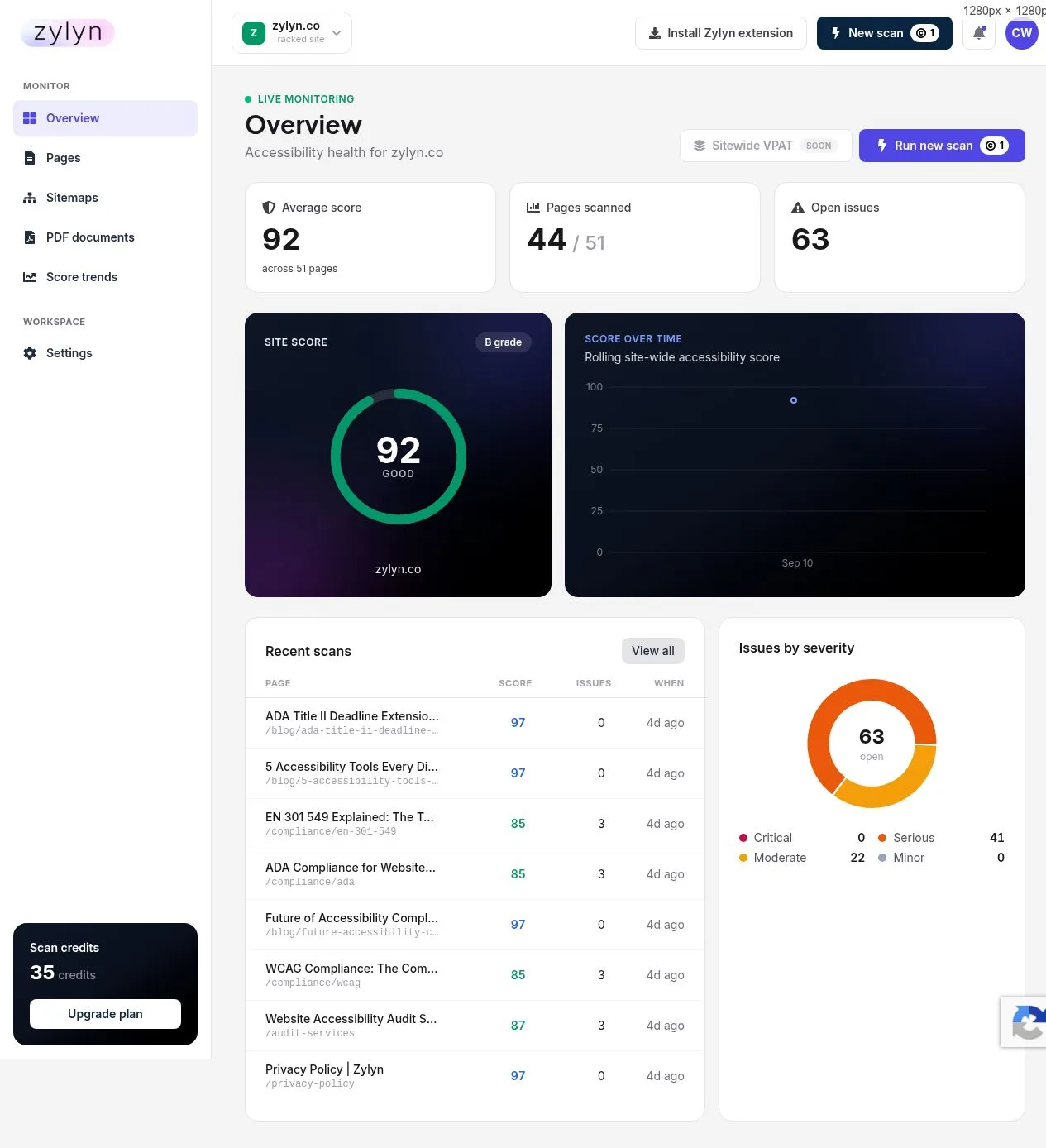
The four numbers at the top#
| Number | What it means |
|---|---|
| Average score | Mean score across every page that has been scanned, with the page count beside it |
| Pages scanned | How many of your discovered pages have actually been scanned — e.g. 44 / 51 |
| Open issues | Total unresolved findings across the site |
| Site score + grade | The headline 0–100 score with a letter grade and label, e.g. 92 · B grade · GOOD |
Watch the "pages scanned" ratio. If it reads 44 / 51, your average score only reflects those 44 pages. Seven pages have never been scanned and could be worse than the rest. A high score across a fraction of your site is not a clean bill of health.
What is a good score?#
Honestly: most sites land in the 70s and 80s on a first scan, and that is normal rather than alarming.
- 90–100 — Good. Remaining issues are usually best-practice items rather than WCAG failures.
- 75–89 — Typical. A handful of real problems, usually repeated across templates.
- Below 75 — Worth prioritising. Likely includes contrast or labelling failures affecting every page.
Two caveats that matter more than the number:
- The score is not a legal compliance rating. It reflects what automated testing can measure. A high score does not mean you are ADA or WCAG compliant, and a low score does not mean you are being sued tomorrow.
- The score counts best-practice rules alongside genuine WCAG failures. A page can score in the 80s while having only one or two actual WCAG violations. Read the findings, not just the number. See reading your report.
Score over time#
The trend chart plots your rolling sitewide score. It becomes useful after a few weeks of scheduled scans — with a single scan there is nothing to trend.
Use it to answer one question: is this getting better or worse? A gradual decline usually means new pages are shipping with problems the rest of the site already fixed.
Recent scans#
The most recently scanned pages, each with score, issue count, and when it ran. Click any row to open the full report. View all takes you to the complete Pages list.
Buttons in the top bar#
- Run new scan (1 credit) — scan any single URL, including one on another domain
- Site selector — switch between sites, or add one
- Install Zylyn extension — for pages behind a login
- Sitewide VPAT — SOON — not available yet