


If the federal design system automates its accessibility testing, who catches the other 70%?
That question is now circulating among public-sector web teams. The team that runs the U.S. Web Design System (USWDS) has said it wants to automate as much automated accessibility testing as possible. USWDS supplies the buttons, forms, and page patterns used across many federal websites. Its former engineering lead estimates that only about 30% of accessibility testing can be reliably automated, according to FedScoop’s reporting.
We’re leaving the politics aside. This post covers the testing itself: what scanners catch well, what they consistently miss, and why the split matters to every city, county, state agency, and public university facing the ADA Title II web deadlines in 2027 and 2028.
Key Takeaways
- Automated tools fully evaluate only a minority of WCAG success criteria, even though they can flag a large share of individual issues on a typical page.
- The barriers scanners miss are the ones that block whole tasks, such as applying for a permit, paying a bill, or finishing a multi-step form with a screen reader.
- Title II requires WCAG 2.1 Level AA, and the Department of Justice says plainly that automated testing tools alone won’t get you there.
What happened with USWDS and automated accessibility testing?
In September 2026, new leadership of the U.S. Web Design System said it would prioritize automating as much accessibility testing as possible. Accessibility practitioners objected because automated tools can reliably verify only a fraction of WCAG. They argued that manual and assistive technology testing must stay in place.
USWDS is a shared library of components and design guidance, maintained by the General Services Administration’s Technology Transformation Services. Federal teams use it so they don’t have to rebuild accessible accordions, date pickers, and form controls from scratch. Its value has always rested on one promise: the components were tested by people, with real assistive technology, before you inherited them.
FedScoop reported in late September that the program had lost most of its staff and contractors. It also reported that a new lead posted a goal to “automate as much accessibility testing as possible.” Former engineering lead Matt Henry responded with a series of posts, including “A design system is what it does,” which the Accessibility Weekly newsletter featured on October 26.
Here’s the thing. You don’t need an opinion on federal staffing to learn from this. Every organization faces the same temptation: if a scanner reports zero errors, it’s tempting to call the work done. The USWDS debate is simply the most visible example of that trade-off this year.
How much of WCAG can automated accessibility testing actually check?
The honest answer depends on what you count. The figures you’ll see quoted range from about 30% to almost 60%, and they don’t contradict each other. They measure different things.
If you count WCAG success criteria, automation covers a minority. Deque’s own coverage report found that automated rules surfaced issues under 16 of the 50 WCAG 2.1 Level AA success criteria. If you count individual issues found on real pages, the share goes up. In the same dataset, automated tests found about 57% of all recorded issues, largely because color contrast failures are so common.
An older but often-cited test from the UK Government Digital Service makes the gap concrete. The team built a page with 143 deliberate accessibility barriers and ran 10 automated tools against it. The best single tool found 41%, and all the tools combined still missed 29% of the barriers, as the GOV.UK accessibility blog reported.
| Measurement | Figure | Source | What it tells you |
|---|---|---|---|
| WCAG 2.1 AA criteria with automated findings | 16 of 50 | Deque coverage report | Most criteria need human judgment |
| Share of total issues found automatically | ~57% | Deque coverage report | Scanners catch high-volume, repetitive issues |
| Barriers found by best single tool | 41% of 143 | GOV.UK GDS, 2017 | One tool alone leaves big gaps |
| Barriers missed by all 10 tools combined | 29% | GOV.UK GDS, 2017 | Some barriers no scanner finds |
| Testing reliably automatable (estimate) | ~30% | Former USWDS engineering lead, via FedScoop | Practitioner view of the full testing job |
So when someone says “about 30%,” they usually mean the scope of testing work. When a vendor says “over half,” they usually mean issue counts. Both are true, and neither one means you can skip manual testing. We break down the criteria in more detail in our guide to automated vs manual accessibility testing coverage.
What does automated accessibility testing catch reliably?
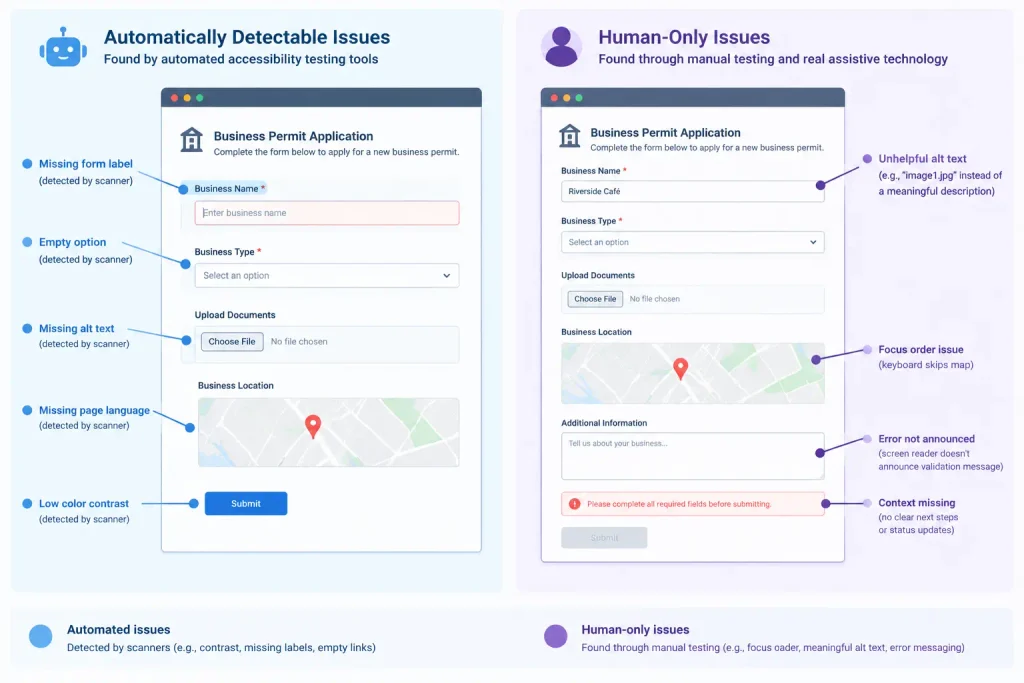
Scanners shine where a rule can be checked against the code without any context. Color contrast is the classic example: the ratio between two hex values is just math. Missing form labels, images with no alt attribute, empty links and buttons, missing page language, and duplicate IDs are all similar.
These issues matter because they’re everywhere. WebAIM’s 2026 analysis of the top one million home pages found detectable WCAG failures on about 96% of them, and we covered what drove that rise in our post on AI-generated code and the 2026 accessibility regression.
Automation also wins on frequency. A person can’t retest 4,000 county web pages every week, but a scheduled scan can. That’s why we treat continuous scanning as the floor of a testing program, not the ceiling.
What does automated testing miss on government websites?
Government sites aren’t brochures. They’re services. People use them to renew licenses, apply for benefits, register for classes, and pay utility bills. The failures that block those tasks are mostly invisible to a scanner. In our manual testing, these are the gaps we flag most often:
- Alt text that exists but says nothing useful, such as “image1.jpg” on a zoning map or a chart of tax rates.
- Focus order and keyboard traps inside date pickers, modals, and multi-step forms.
- Error messages that a screen reader never announces, so the user doesn’t know why the form won’t submit.
- Session timeouts that wipe a half-finished application without warning.
- Link text that only makes sense visually, like ten “Learn more” links on one page.
- PDFs and scanned documents that hold the actual information the web page points to.
- Plain language and cognitive load, which no rule engine can judge.
Notice the pattern. Each item needs someone to understand intent and complete a task, often with a screen reader or keyboard alone. That’s exactly the work a “zero errors” dashboard can hide.
Want to see what a scanner finds on your own site first? Run a free Zylyn accessibility scan on any public page. You don’t need an account or an install, and you’ll see exactly which issues automation flags before planning your manual review.
Why does the automated vs manual split matter for ADA Title II deadlines?
Under the Department of Justice’s Title II web rule, state and local governments must meet WCAG 2.1 Level AA for their web content and mobile apps. After an April 2026 extension, the compliance dates are April 26, 2027 for entities serving 50,000 people or more, and April 26, 2028 for smaller entities and special districts.
The DOJ’s own guidance is direct. Its first steps for the web rule on ADA.gov says you won’t be able to use automated testing tools alone and should combine automated and manual assessments. A program built only on scan scores doesn’t match that guidance.
Timing makes this sharper. Manual audits, document remediation, and vendor fixes all take months, not days. Teams that wait until early 2027 to discover their forms fail with a screen reader will run out of runway. If your backlog includes hundreds of PDFs, start with our guide to ADA Title II PDF accessibility triage.
How should government teams split automated and manual accessibility testing?
Simple. Let automation handle breadth, and let people handle depth. Here’s the plan we recommend to public-sector teams.
Step 1: Scan everything on a schedule. Run automated checks across your whole domain weekly, and in your build pipeline for new releases. This catches regressions and the repetitive issues fast. Continuous accessibility monitoring keeps the scan from becoming a one-time snapshot.
Step 2: Pick your top tasks. List the 10 to 20 services residents use most, such as payments, applications, and search. These journeys get full manual testing, not just their landing pages.
Step 3: Test those tasks with assistive technology. Use a keyboard alone, then a screen reader such as NVDA or JAWS with a browser, then mobile VoiceOver or TalkBack. Our post on screen reader testing combinations explains which pairings cover most users.
Step 4: Test components once, then test them in context. A date picker can pass alone and still fail inside your specific form. Shared components deserve deep testing, but every new use still needs a quick human check.
Step 5: Document what you tested and how. Record the tool results, the manual steps, and the dates. That record is your evidence of progress if a complaint arrives.
Pro tip: Give every manual finding a WCAG criterion and a “task impact” rating. A contrast issue on a footer link and a keyboard trap on a payment form are both failures, but only one stops a resident from paying a bill.
What does “a design system is what it does” mean for accessibility?
Henry’s essay borrows a systems-thinking idea: judge a system by what it produces, not by what it claims. For a design system, the real output is the experience people get on thousands of live pages. A test suite passing on a component library tells you very little about that experience.
That cuts both ways. A well-tested design system is one of the most efficient accessibility investments a government can make, because one fix spreads to every team that uses the component. But the reverse is also true. One untested regression in a shared form control spreads the same way, across every agency that pulls the update.
If your state, county, or university runs its own component library, the lesson is the same as for USWDS. Fund human testing at the component level, because that’s where it pays off most. Then make sure the teams consuming those components know what they still have to check. Our accessibility training for product teams covers what designers, developers, and content authors each need to verify.
What mistakes do teams make with automated accessibility testing?
Treating a 100 score as compliance. Lighthouse and similar tools only score the checks they can run. A perfect score can sit on top of a form that no screen reader user can submit.
Running one tool and calling it coverage. Different engines use different rules and catch different things. The GOV.UK test showed that even 10 tools combined missed nearly a third of known barriers.
Testing pages instead of tasks. Residents don’t visit pages, they complete services. A scan of the landing page tells you nothing about step four of an application.
Letting AI tools grade their own work. AI coding assistants can produce markup that looks accessible and report checks that never ran. Always verify AI-generated fixes with an independent test and a human review.
Forgetting documents. Many government sites link to PDFs that hold the actual policy, form, or schedule. Most web scanners don’t evaluate these files the way a person reads them.
Frequently Asked Questions
What percentage of accessibility issues can automated testing find?
It depends on the measure. Automated rules cover a minority of WCAG criteria, but on real pages they can flag over half of total issues because contrast errors are so common.
Is automated accessibility testing enough for ADA Title II compliance?
No. The DOJ’s guidance says automated testing tools alone aren’t enough and recommends combining automated and manual assessments to meet WCAG 2.1 AA.
What is the USWDS?
The U.S. Web Design System is a free library of accessible components and design guidance, maintained by GSA, that federal teams use to build consistent websites.
When is the ADA Title II web accessibility deadline?
April 26, 2027 for state and local governments serving 50,000 or more people, and April 26, 2028 for smaller entities and special district governments.
Can AI replace manual accessibility testing?
Not today. AI can speed up triage and suggest fixes, but people still need to judge meaning, task completion, and real assistive technology behavior.
Which WCAG issues can scanners detect best?
Color contrast, missing alt attributes, missing form labels, empty links or buttons, missing page language, and some ARIA misuse are the strongest areas for automation.
How often should government websites run automated accessibility scans?
Weekly across the full domain is a good baseline, plus a scan on every release. High-traffic services may justify daily monitoring.
What manual tests should a government website prioritize?
Start with keyboard-only and screen reader testing of your most-used services, such as payments, applications, and search, from start to finish.
Do accessibility overlays help with Title II compliance?
Overlays don’t fix your source code, and they don’t replace the testing and remediation that WCAG 2.1 AA conformance requires.
How long does a manual accessibility audit take?
For 10 to 20 key templates and tasks, plan on one to three weeks. Large document libraries and complex apps take longer.
Conclusion
The USWDS debate gives every public-sector team a useful reminder. Automated accessibility testing is essential for scale, speed, and catching regressions, but it fully covers only part of WCAG. The barriers it misses are the ones that stop residents from finishing real tasks.
With Title II deadlines set for April 2027 and April 2028, the safest plan is a split one. Scan everything continuously, test your top services by hand with assistive technology, and keep a record of both. Start now, and you’ll be ahead of the deadline instead of racing it.
Ready to build a testing plan that covers the other 70%? Book a walkthrough with the Zylyn team and we’ll show you how automated scans and manual testing work together for government websites.
Last updated: October 2026