

Last Updated: October 2026
Your website might pass. Your 13,000 PDFs probably won’t.
Most city, county, and school district teams have spent the past year fixing templates, menus, and color contrast. That work matters. But for most public entities, the bigger problem is the document library. Years of agendas, ordinances, permit forms, budgets, and scanned flyers sit behind your website, and ADA Title II PDF accessibility is where the volume really is.
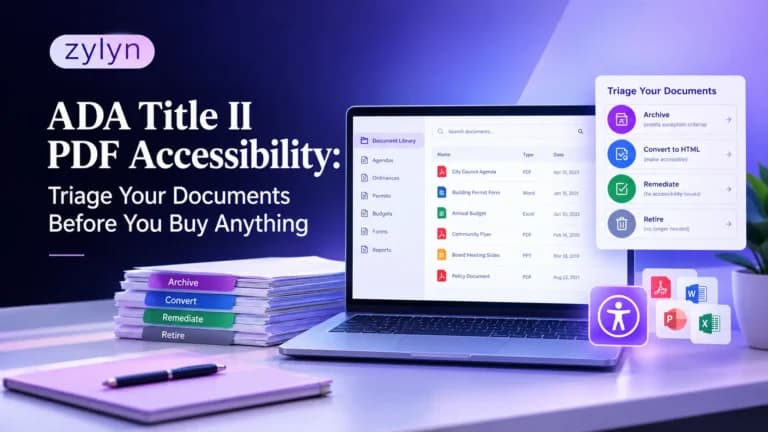
This guide explains what the DOJ’s Title II rule requires for PDFs and other documents, which files fall under an exception, and how to sort your library into archive, convert, and remediate piles. Do that triage first, and you’ll know what to buy, what to fix in-house, and what to retire.
Key Takeaways
- Documents count. Under the Title II rule, PDFs, Word files, slide decks, and spreadsheets on your website must meet WCAG 2.1 Level AA unless a specific exception applies.
- Exceptions are narrow. Old documents can be exempt, but not if people still use them to apply for, access, or join a service, program, or activity.
- Triage cuts the bill. Sorting files into archive, convert to HTML, remediate, or retire shrinks the remediation pile before you sign a contract.
What does ADA Title II require for PDF accessibility?
Quick answer: ADA Title II requires state and local governments to make web content and mobile apps conform to WCAG 2.1 Level AA. That includes “conventional electronic documents” such as PDFs, Word files, presentations, and spreadsheets posted online. Limited exceptions exist for some older, archived, or individualized documents.
The DOJ’s 2024 rule under Title II of the Americans with Disabilities Act set one technical standard for public entities: WCAG 2.1 Level AA. It applies to the content you provide or make available through your website and mobile apps, and the rule names conventional electronic documents directly. In plain terms, that’s any PDF, word processing file, presentation, or spreadsheet you post.
So a meeting agenda in PDF form gets judged the same way as your homepage. A screen reader user needs to be able to read it, navigate its headings, understand its tables, and fill in its form fields. If they can’t, the document fails, even if the web page linking to it passes every automated check.
Here’s the thing. Most Title II compliance plans start with the website because it’s visible. The document library rarely gets the same attention, and it’s usually many times larger.
When are the Title II document deadlines?
In April 2026, the DOJ issued an interim final rule that pushed the original compliance dates back by about a year. According to the DOJ’s first steps guidance on ADA.gov, the current dates are:
| Public entity | Compliance date | Standard |
|---|---|---|
| Population of 50,000 or more | April 26, 2027 | WCAG 2.1 Level AA |
| Population under 50,000 | April 26, 2028 | WCAG 2.1 Level AA |
| Special district governments | April 26, 2028 | WCAG 2.1 Level AA |
The standard itself didn’t change. Only the timing moved. The National Federation of the Blind has challenged the extension in federal court in Maryland, and as of mid-October 2026 there was no ruling. Plan for the current dates, and watch for changes.
There’s another reason the date matters for documents. Your compliance date is also the cutoff for the preexisting document exception. Files posted before that date may qualify. Files posted after it don’t.
Which PDFs are exempt under the Title II rule?
The rule includes five exceptions. Three of them matter most for document libraries, and each one is narrower than most teams expect.
Preexisting conventional electronic documents. PDFs, Word files, presentations, and spreadsheets posted before your compliance date can be exempt. The exception doesn’t apply to documents people currently use to apply for, access, or participate in your services, programs, or activities. A 2019 permit application that residents still download today doesn’t qualify. If you edit a qualifying document after your compliance date, it loses the exception.
Archived web content. Older content can be exempt if it meets all four conditions: it was created before your compliance date (or reproduces material that was), you keep it only for reference, research, or recordkeeping, it sits in an area clearly labeled as an archive, and you haven’t changed it since archiving. Miss one condition and the exception is gone.
Individualized, password-protected documents. A utility bill, tax statement, or case file about one person, property, or account can be exempt when it’s secured behind a login. Documents for general public use never qualify, even if they sit behind a password.
One rule applies to all of these. Even when an exception applies, you may still have to provide an accessible version to a person with a disability who asks for one. The DOJ’s guidance also says that current applications and current ordinances in PDF form probably have to meet WCAG 2.1. An exception lowers your workload. It doesn’t end your obligation.
Why is the document library the biggest Title II risk?
Volume. On October 17, 2026, the Town of Brookhaven, New York, won a 2026 Government Experience Award from the Center for Digital Government for its DocAccess implementation. According to Long Island Life & Politics, the project expanded access to more than 13,000 town documents after launching in March.
That’s one town. Brookhaven is large, but the pattern holds for smaller entities too. Every department publishes. Clerks post minutes, planning posts site plans, parks posts registration forms, finance posts budgets. Most of those files were never built with tagged PDF structure, and many are scans of paper.
In our experience, teams also underestimate how many documents they have. Sitemaps and CMS media libraries rarely list everything. Files get linked from news posts, embedded in third-party portals, or uploaded years ago by staff who’ve since left. You can’t triage what you haven’t counted, so the inventory comes first.
How do you triage a government document library?
Triage means deciding what happens to each document before anyone pays to fix it. Here’s the process we recommend to public sector teams.
- Inventory every document. Crawl your website for linked PDFs, Word files, slide decks, and spreadsheets, then add files from your CMS, vendor portals, and agenda management tools. Record the URL, title, owning department, posting date, page count, and whether it’s a scan.
- Flag active-use documents. Mark anything residents use to apply for, access, or join a service. Forms, applications, current ordinances, fee schedules, and program guides go to the top of the list, whatever their age.
- Test each remaining file against the exceptions. Check the posting date against your compliance date, then check the four archive conditions. Write down the reason for each decision.
- Assign a disposition. Every document gets one of four outcomes: retire, archive, convert to HTML, or remediate. The table below shows how to choose.
- Fix the source, not just the file. Update the Word and InDesign templates your departments use, so new documents come out accessible from day one.
- Set a request process. Publish how residents can ask for an accessible version of any document, and decide who responds and how fast.
| Disposition | Best fit | Typical effort | Example |
|---|---|---|---|
| Retire | Outdated, duplicated, or unused files | Low | A 2017 event flyer still linked from an old news post |
| Archive | Older records kept only for reference, never edited | Low to medium (needs a labeled archive section) | Pre-compliance council minutes |
| Convert to HTML | Short, frequently read content that changes often | Medium, then easier to maintain | A fee schedule or parks program guide |
| Remediate | Documents that must stay in PDF format and stay in active use | Medium to high, depending on complexity | A fillable permit application or annual budget |
Most teams find the retire and archive piles are bigger than they expected. That’s the point of triage. Every file you retire or archive correctly is one you don’t pay to remediate.
Pro tip: Run a free accessibility check on the pages that link to your documents first. If the pages that link to your documents fail, fixing the PDFs alone won’t get residents to them.
If you’d like help building the inventory and sorting the piles, Zylyn’s accessibility audit services cover web pages and the documents behind them, so you get one prioritized list instead of two.
Should you remediate a PDF or convert it to HTML?
Often, HTML wins. A web page is easier to make accessible, easier to update, and easier to read on a phone. If a document is short, read often, and updated regularly, converting it to a web page usually costs less over its lifetime than remediating every new version of the PDF.
PDF still makes sense in some cases. Legal records that must be preserved exactly, print-ready reports, and documents with official signatures often need to stay in PDF format. For those, PDF remediation means adding tags, reading order, alternative text, and form labels so assistive technology can use the file.
Complexity drives cost more than page count. A clean, text-based PDF exported from Word with headings intact is quick to fix. A scanned budget with nested tables, charts, and no source file is a different job. When you do get quotes, ask for a pilot on a sample of your real documents, because published per-page rates vary widely depending on the service level included.
What does an accessible PDF actually need?
An accessible PDF works for someone who can’t see the screen, can’t use a mouse, or relies on magnification. Under WCAG 2.1 AA, that comes down to a few core elements.
The document needs real tags that mark headings, paragraphs, lists, and tables, plus a logical reading order. Images that carry meaning need alternative text, and decorative images should be marked as artifacts so screen readers skip them. Tables need header cells defined. Form fields need labels and a sensible tab order.
The file also needs a document title, a set language, and enough color contrast for text. Scanned pages need real text, not just a picture of text. Automated PDF checkers catch some of this, but they can’t tell you whether alt text makes sense or whether the reading order matches the visual layout. That takes manual testing with a screen reader such as NVDA.
What mistakes slow down Title II document compliance?
Remediating before counting. Teams sign per-page contracts and then discover thousands of files they didn’t know about. Count first, then price.
Treating “old” as “exempt.” Age alone doesn’t qualify a document. If residents still use it for a service, it has to meet the standard.
Editing archived files. Fixing a typo in an archived PDF can remove it from the archive exception. Leave archived files untouched, or make them accessible.
Fixing files but not templates. If departments keep exporting untagged PDFs from old templates, the backlog grows back. Fix the source files and train the people who publish.
Relying only on automated checkers. A PDF can pass a tag check and still be unusable. Test a sample with a screen reader before you sign off.
Buying a widget for documents. On-page overlay tools don’t change what’s inside a PDF. The file itself has to be fixed, replaced, or archived properly.
Frequently Asked Questions
Do PDFs have to be accessible under ADA Title II?
Yes. PDFs and other conventional electronic documents on public entity websites must meet WCAG 2.1 AA unless an exception applies.
What WCAG version does Title II require?
The rule requires WCAG 2.1 Level AA for web content, mobile apps, and the documents posted on them.
When is the ADA Title II PDF deadline?
April 26, 2027 for entities with 50,000 or more people, and April 26, 2028 for smaller entities and special districts.
Are old PDFs exempt from Title II?
Some are. Documents posted before your compliance date can be exempt, unless people still use them to access services.
What counts as archived content under Title II?
Content created before your compliance date, kept only for reference or records, in a labeled archive, and never changed since.
Do scanned PDFs need to be accessible?
Yes, if they’re in active use or don’t qualify for an exception. A scan needs real, tagged text, not just an image.
Is converting a PDF to HTML allowed?
Yes. Publishing the content as an accessible web page is often simpler to maintain than remediating a PDF.
Do agenda packets and meeting minutes need to be accessible?
Current agendas and packets people use to take part in meetings should be accessible. Older minutes may qualify for archiving.
Can we just remediate documents on request?
Request-based fixes apply to exempt documents. Active-use documents must meet the standard by your compliance date.
Can automated tools check PDF accessibility?
They catch missing tags and some structural issues, but you still need manual and screen reader testing for full coverage.
Conclusion
ADA Title II PDF accessibility is where most public entities will spend the bulk of their compliance effort, because documents are where the volume is. The rule sets WCAG 2.1 AA for PDFs, Word files, slides, and spreadsheets, and the exceptions are narrower than they look.
The smartest move is triage. Count every document, flag the ones residents actively use, test the rest against the exceptions, and sort each file into retire, archive, convert, or remediate. Then fix your templates so the backlog doesn’t come back. With deadlines in April 2027 and April 2028, you have time to do this properly, but not time to wait.
Ready to see where your website and documents stand? Book a walkthrough with the Zylyn team and we’ll help you build a document inventory and a triage plan you can act on.